enable password の設定方法
目的
- enable password の設定方法を理解する
初期 Config
RT1
conf t
!
hostname RT1
!
logging console
!
end
ハンズオン
1, モードに関して
ネットワーク機器 (IOS/IOS-XE) には "モード" の概念があり、以下のようになっています。
各モードへは指定のコマンドを実行することで移行することが出来、「すべての Configuration mode」からは "end" を実行することで「特権 EXEC mode」へ移行することができます。
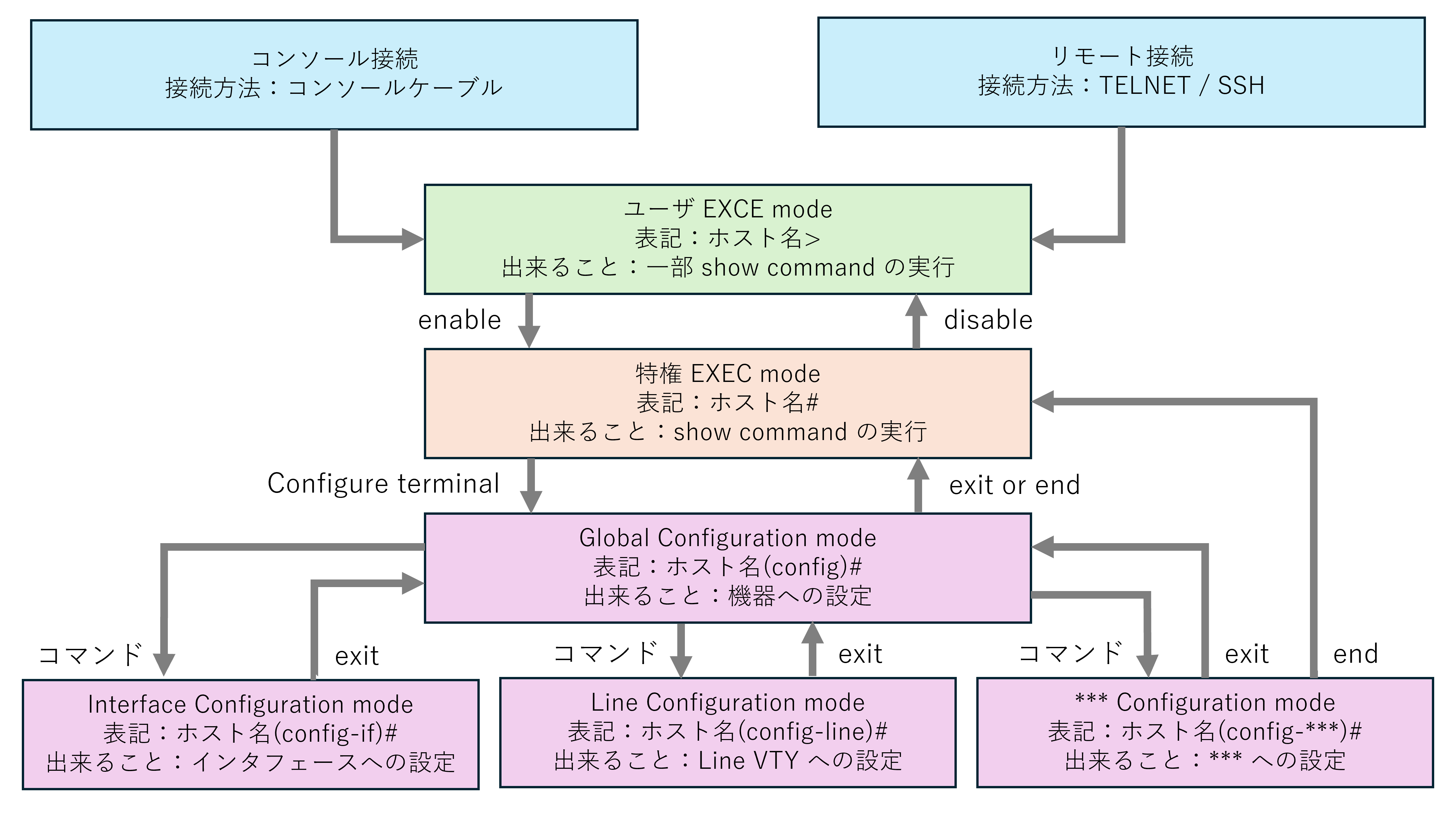
2, enable password の設定方法
「ユーザ EXEC mode」から「特権 EXEC mode」に移行する際に以下設定でパスワード入力を求めることができます。これによりセキュリティを高めることが出来ます。
(config)#enable password [任意の文字列]
今回はパスワードとして "itnet" を設定し、show run で設定値の確認も行います。
RT1(config)#enable password
RT1(config)#do sh run | se enable password
enable password itnet
また、設定時に以下のような log が出力されています。これはパスワードが暗号化されていないことを示す注意文です。商用環境では一般的にパスワードは暗号化されます。(後述)
WARNING: Configured enable password CLI with weak encryption type 0 will be deprecated in future. Hence please migrate to enable secret CLI which accomplishes same functionality as enable password CLI and which also supports strong irreversible encryption type 9
*May 15 11:20:46.475: %AAAA-4-CLI_DEPRECATED: WARNING: Configured enable password CLI with weak encryption type 0 will be deprecated in future. Hence please migrate to enable secret CLI which accomplishes same functionality as enable password CLI and which also supports strong irreversible encryption type 9
設定が完了したため、一度「ユーザ EXEC モード」まで戻り、その後再び「特権 EXEC モード」への移行を試みます。
すると、パスワードを設定したためパスワード入力が求められるようになったことがわかります。
RT1(config)#end
RT1#exit
RT1 con0 is now available


Press RETURN to get started.
RT1>enable
Password:
誤ったパスワードを3回入力すると、以下のように "Bad passwords" と表示されます。
RT1>enable
Password:
Password:
Password:
% Bad passwords
正しいパスワードを入力すると「特権 EXEC モード」に移行できます。
RT1>enable
Password:
RT1#
3, パスワードの暗号化
以下のコマンドを使用することで、config に含まれる全てのパスワードを暗号化できます。商用環境では使われることが多いです。
(config)#service password-encryption
設定前後の "show running-config" の出力を見ると、設定前は平文でパスワードが表示されているが、設定後は暗号化されていることがわかります。
RT1(config)#do sh run | se enable password
enable password itnet
RT1(config)#
RT1(config)#service password-encryption
RT1(config)#
RT1(config)#do sh run | se enable password
enable password 7 141E06050910
4, まとめ
学習環境では不要ですが、商用環境ではセキュリティの観点からあらゆるものにパスワードが設定されるため認識しておきましょう。
ログインすると、進捗を保存できます。
← ロードマップ に戻る