問題
・以下の通りに HSRP を設定しなさい。
| パラメータ | 内容 |
| Standby Group | 10 |
| Priority | RT2 Eth0/0 : 110 RT3 Eth0/0 : 100 |
| Virtual IP address | 192.168.123.254 |
・RT1 からRT4 (4.4.4.4) に通信できることを確認しなさい。
構成図
物理構成図:
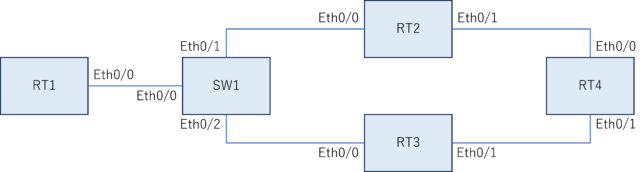
論理構成図:
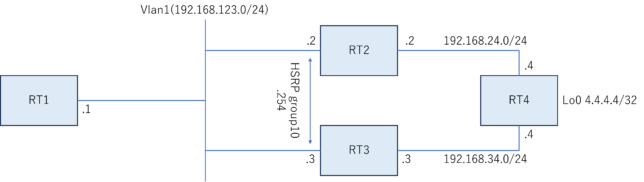
初期Config
RT1
conf t
!
interface Ethernet 0/0
 ip address 192.168.123.1 255.255.255.0
 no shutdown
!
ip route 0.0.0.0 0.0.0.0 Ethernet0/0 192.168.123.254
!
end
RT2
conf t
!
interface Ethernet 0/0
 ip address 192.168.123.2 255.255.255.0
 no shutdown
!
interface Ethernet 0/1
 ip address 192.168.24.2 255.255.255.0
 no shutdown
!
ip route 0.0.0.0 0.0.0.0 Ethernet0/1 192.168.24.4
!
end
RT3
conf t
!
interface Ethernet 0/0
 ip address 192.168.123.3 255.255.255.0
 no shutdown
!
interface Ethernet 0/1
 ip address 192.168.34.3 255.255.255.0
 no shutdown
!
ip route 0.0.0.0 0.0.0.0 Ethernet0/1 192.168.34.4
!
end
RT4
conf t
!
interface Ethernet 0/0
 ip address 192.168.24.4 255.255.255.0
 no shutdown
!
interface Ethernet 0/1
 ip address 192.168.34.4 255.255.255.0
 no shutdown
!
interface loopback0
 ip address 4.4.4.4 255.255.255.255
!
ip route 192.168.123.0 255.255.255.0 Ethernet0/0 192.168.24.2
ip route 192.168.123.0 255.255.255.0 Ethernet0/1 192.168.34.3
!
end
SW1
なし
回答
回答
RT2 :
conf t
!
interface Ethernet0/0
 standby 10 ip 192.168.123.254
 standby 10 priority 110
!
end
----------------------------------------------------------------------------------------------------
RT3 :
conf t
!
interface Ethernet0/0
 standby 10 ip 192.168.123.254
!
end
解説
HSRP を使用すると2台の Router で Active/Standby の冗長構成を構築できる。これにより、Active 側に障害が発生した場合でも到達性を維持できる。
HSRP の status は以下のコマンドで確認できる。今回は Priority 値の高い RT2 が Active となっている。
RT2#show standby
Ethernet0/0 - Group 10
  State is Active
    2 state changes, last state change 14:18:35
  Virtual IP address is 192.168.123.254
  Active virtual MAC address is 0000.0c07.ac0a
    Local virtual MAC address is 0000.0c07.ac0a (v1 default)
  Hello time 3 sec, hold time 10 sec
    Next hello sent in 0.336 secs
  Preemption disabled
  Active router is local
  Standby router is 192.168.123.3, priority 100 (expires in 9.504 sec)
  Priority 110 (configured 110)
  Group name is "hsrp-Et0/0-10" (default)
----------------------------------------------------------------------------------------------------
RT3#show standby
Ethernet0/0 - Group 10
  State is Standby
    1 state change, last state change 14:18:43
  Virtual IP address is 192.168.123.254
  Active virtual MAC address is 0000.0c07.ac0a
    Local virtual MAC address is 0000.0c07.ac0a (v1 default)
  Hello time 3 sec, hold time 10 sec
    Next hello sent in 0.480 secs
  Preemption disabled
  Active router is 192.168.123.2, priority 110 (expires in 10.208 sec)
  Standby router is local
  Priority 100 (default 100)
  Group name is "hsrp-Et0/0-10" (default)
HSRP では Active 機が VIP に紐づく MAC address に対して ARP 応答や GARP を送出する。そのため、SW1 の MAC address table を見ると Eth0/1 で VIP の MAC address を学習していることがわかる。
SW1#show mac address-table
          Mac Address Table
-------------------------------------------

Vlan    Mac Address       Type        Ports
----    -----------       --------    -----
   1    0000.0c07.ac0a    DYNAMIC     Et0/1
   1    aabb.cc00.0100    DYNAMIC     Et0/0
   1    aabb.cc00.0200    DYNAMIC     Et0/1
   1    aabb.cc00.0400    DYNAMIC     Et0/2
Total Mac Addresses for this criterion: 4
最後に RT1 から RT4(4.4.4.4) へ疎通確認を行う。以下のように traceroute を実行すると、traceroute への応答は VIP からではなく実IPで返ってくるため、どの機器を経由しているか確認もできる。
RT1#ping 4.4.4.4
Type escape sequence to abort.
Sending 5, 100-byte ICMP Echos to 4.4.4.4, timeout is 2 seconds:
!!!!!
Success rate is 100 percent (5/5), round-trip min/avg/max = 1/1/2 ms
----------------------------------------------------------------------------------------------------
RT1#traceroute 4.4.4.4
Type escape sequence to abort.
Tracing the route to 4.4.4.4
VRF info: (vrf in name/id, vrf out name/id)
  1 192.168.123.2 1 msec 1 msec 1 msec
  2 192.168.24.4 1 msec 1 msec 1 msec