trunk port の設定(回答)
回答
SW1(config)#vlan 10,20
SW1(config-vlan)#exit
SW1(config)#!
SW1(config)#interface ethernet0/0
SW1(config-if)#switchport access vlan 10
SW1(config-if)#exit
SW1(config)#!
SW1(config)#interface ethernet0/1
SW1(config-if)#switchport trunk encapsulation dot1q
SW1(config-if)#switchport mode trunk
SW1(config-if)#switchport trunk allowed vlan 10,20
SW1(config-if)#exit
SW1(config)#!
SW1(config)#interface ethernet0/2
SW1(config-if)#switchport access vlan 20
SW2(config)#vlan 10,20
SW2(config-vlan)#exit
SW2(config)#!
SW2(config)#interface ethernet0/0
SW2(config-if)#switchport trunk encapsulation dot1q
SW2(config-if)#switchport mode trunk
SW2(config-if)#switchport trunk allowed vlan 10,20
SW2(config-if)#exit
SW2(config)#!
SW2(config)#interface ethernet0/1
SW2(config-if)#switchport trunk encapsulation dot1q
SW2(config-if)#switchport mode trunk
SW2(config-if)#switchport trunk allowed vlan 10,20
解説
スイッチでは access port と trunk port という概念が存在し、それぞれ以下のような処理となります。
access port :
主に PC などの端末やルータの接続ポートとして使用する。
tag をつけずに送信し、そのポートで受信したフレームを設定された vlan として内部処理する。
trunk port :
主にスイッチ間の接続ポートとして使用する。
tag をつけて送信し、そのポートで受信したフレームは付与されている tag を参照して内部処理する。付与されている tag が allowed (許可) されていない場合は破棄する。
また、native vlan という概念も存在し、これは native vlan として指定された vlan は trunk port だが tag をつけずに送信し、tag が付いていないフレームは設定された vlan として内部処理する。
今回は vlan10,20 を作成した後、問題文に従い以下のように設定します。
SW1 Eth0/0
access port (default) とし、 vlan 10 を割り当てる
SW1(config)#interface ethernet0/0
SW1(config-if)#switchport access vlan 10
SW1 Eth0/1
trunk port とし、 vlan 10 と 20 を許可する
SW1(config)#interface ethernet0/1
SW1(config-if)#switchport trunk encapsulation dot1q
SW1(config-if)#switchport mode trunk
SW1(config-if)#switchport trunk allowed vlan 10,20
SW1 Eth0/2
access port (default) とし、 vlan 20 を割り当てる
SW1(config)#interface ethernet0/0
SW1(config-if)#switchport access vlan 10
SW2 Eth0/0
trunk port とし、 vlan 10 と 20 を許可する
SW2(config)#interface ethernet0/0
SW2(config-if)#switchport trunk encapsulation dot1q
SW2(config-if)#switchport mode trunk
SW2(config-if)#switchport trunk allowed vlan 10,20
****
SW2 Eth0/1
trunk port とし、 vlan 10 と 20 を許可する
SW2(config)#interface ethernet0/1
SW2(config-if)#switchport trunk encapsulation dot1q
SW2(config-if)#switchport mode trunk
SW2(config-if)#switchport trunk allowed vlan 10,20
設定後、各 SW の access port 及び trunk port の出力が変更し、設定通りに VLAN が割り当てられていることがわかります。
SW1#show vlan brief

VLAN Name                             Status    Ports
---- -------------------------------- --------- -------------------------------
1    default                          active    Et0/3
10   VLAN0010                         active    Et0/0
20   VLAN0020                         active    Et0/2
1002 fddi-default                     act/unsup
1003 token-ring-default               act/unsup
1004 fddinet-default                  act/unsup
1005 trnet-default                    act/unsup
SW1#show interfaces trunk

Port           Mode             Encapsulation  Status        Native vlan
Et0/1          on               802.1q         trunking      1

Port           Vlans allowed on trunk
Et0/1          10,20

Port           Vlans allowed and active in management domain
Et0/1          10,20

Port           Vlans in spanning tree forwarding state and not pruned
Et0/1          10,20
SW2#show vlan brief

VLAN Name                             Status    Ports
---- -------------------------------- --------- -------------------------------
1    default                          active    Et0/2, Et0/3
10   VLAN0010                         active
20   VLAN0020                         active
1002 fddi-default                     act/unsup
1003 token-ring-default               act/unsup
1004 fddinet-default                  act/unsup
1005 trnet-default                    act/unsup
SW2#show interfaces trunk

Port           Mode             Encapsulation  Status        Native vlan
Et0/0          on               802.1q         trunking      1
Et0/1          on               802.1q         trunking      1

Port           Vlans allowed on trunk
Et0/0          10,20
Et0/1          10,20

Port           Vlans allowed and active in management domain
Et0/0          10,20
Et0/1          10,20

Port           Vlans in spanning tree forwarding state and not pruned
Et0/0          10,20
Et0/1          10,20
設定が完了したため、最後に各ネットワーク間で通信が可能なことを確認します。
RT1#ping 10.1.20.2
Type escape sequence to abort.
Sending 5, 100-byte ICMP Echos to 10.1.20.2, timeout is 2 seconds:
!!!!!
Success rate is 100 percent (5/5), round-trip min/avg/max = 1/2/4 ms
備考
例として、trunk port を経由した通信(RT1 から RT3 への通信)の流れとしては以下のようになります。
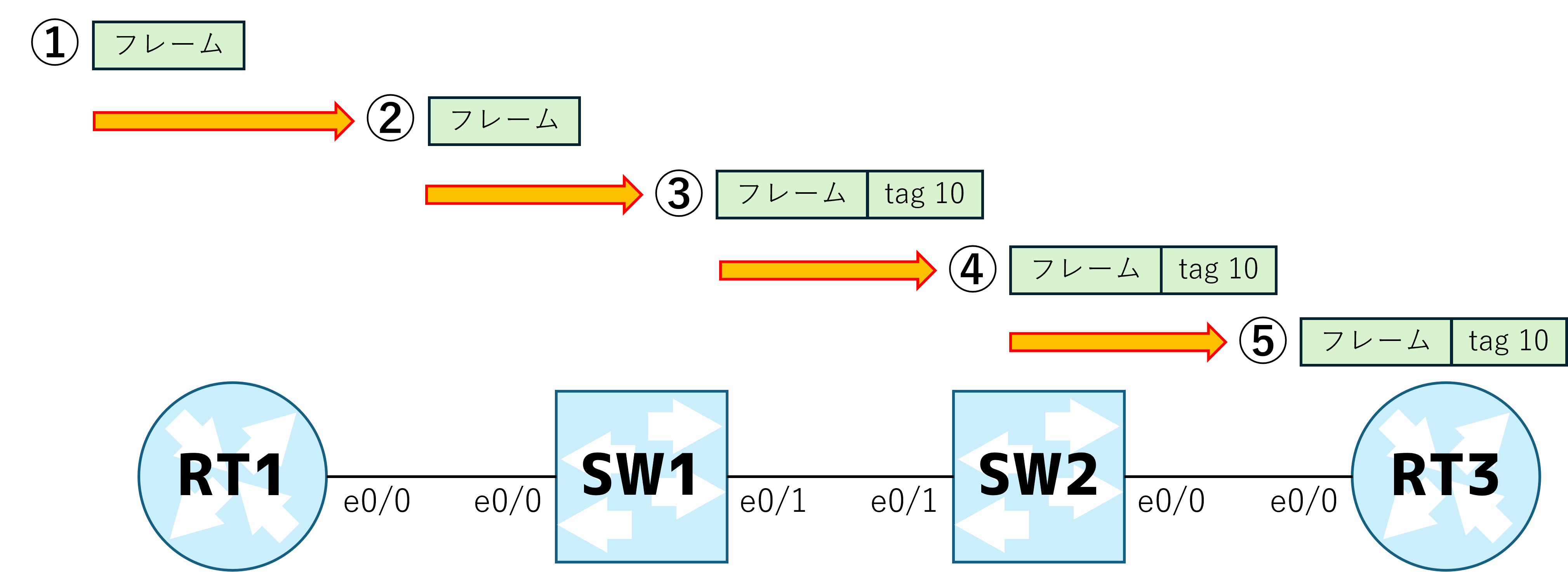
- RT1 が eth0/0 からフレームを送信。(routed port のため tag なし)
- SW1 が eth 0/0 でフレームを受信し、access port のため設定されている vlan 10 として内部処理
- SW1 が mac address table を参照し、宛先 mac address から eth0/1 への転送を決定。 eth0/1 は trunk port であるため、vlan10 の tag をつけて送信
- SW2 が eth0/1 でフレームを受信し、tag を参照して vlan10 であることを認識し、allowed されているため次の処理に進む。mac address table を参照し、宛先 mac address から eth0/0 への転送を決定。eth0/0 は trunk port であるため、tag 10 を付けて送信
- RT2 が eth0/0 でフレームを受信し、sub interface であるため tag を参照して vlan10 であることを認識し、宛先 mac address と I/F の mac address が一致していることを確認
無料登録すると、ここから先がつながります
- ・ロードマップに沿って「次に読む記事」が分かる
- ・読んだ記事・解いた問題の進捗が保存される
- ・無料公開分の試験対策問題集を解いて正誤を記録できる