conf t
!
hostname RT1
!
interface Loopback0
 ip address 192.0.2.1 255.255.255.255
!
interface Ethernet0/0
 ip address 10.1.1.1 255.255.255.0
 no shutdown
!
interface Ethernet0/1
 ip address 10.1.2.1 255.255.255.0
 no shutdown
!
logging console
!
end
RT2
conf t
!
hostname RT2
!
interface Loopback0
 ip address 192.0.2.2 255.255.255.255
!
interface Ethernet0/0
 ip address 10.1.1.2 255.255.255.0
 no shutdown
!
interface Ethernet0/1
 ip address 10.1.2.2 255.255.255.0
 no shutdown
!
logging console
!
end
ハンズオン
1, AD とは
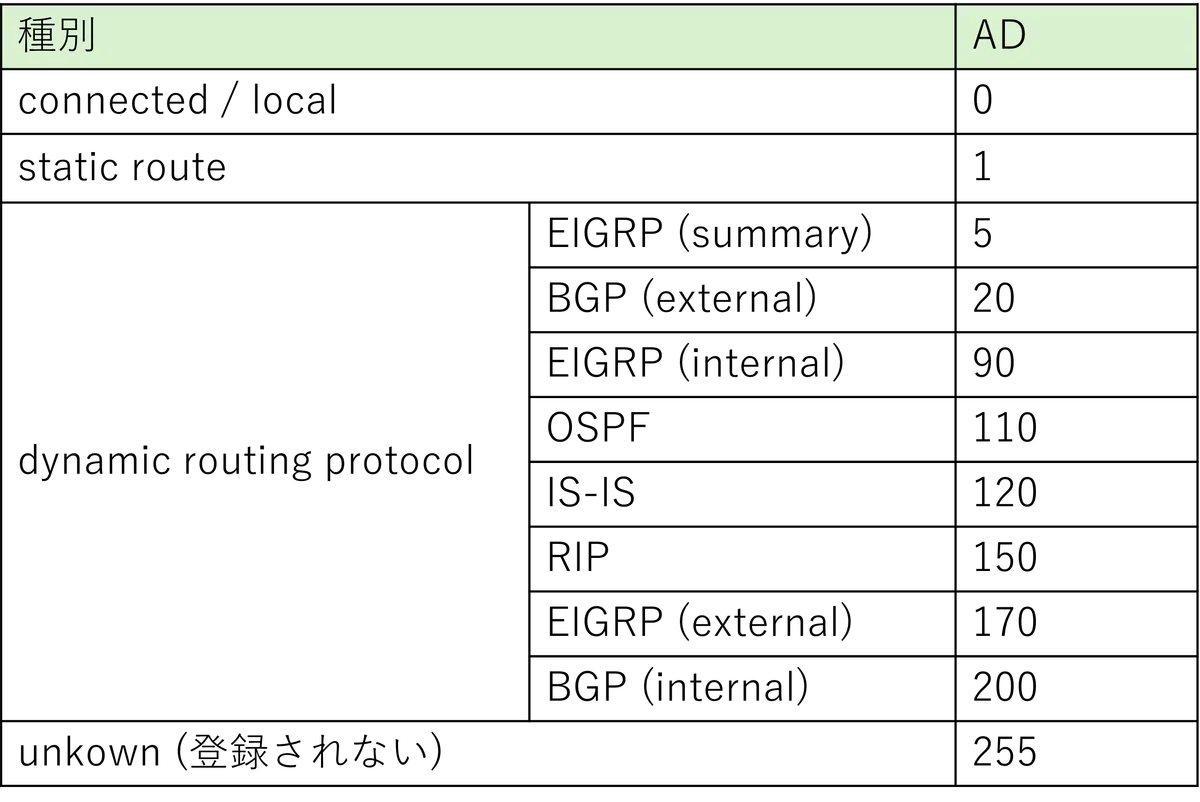
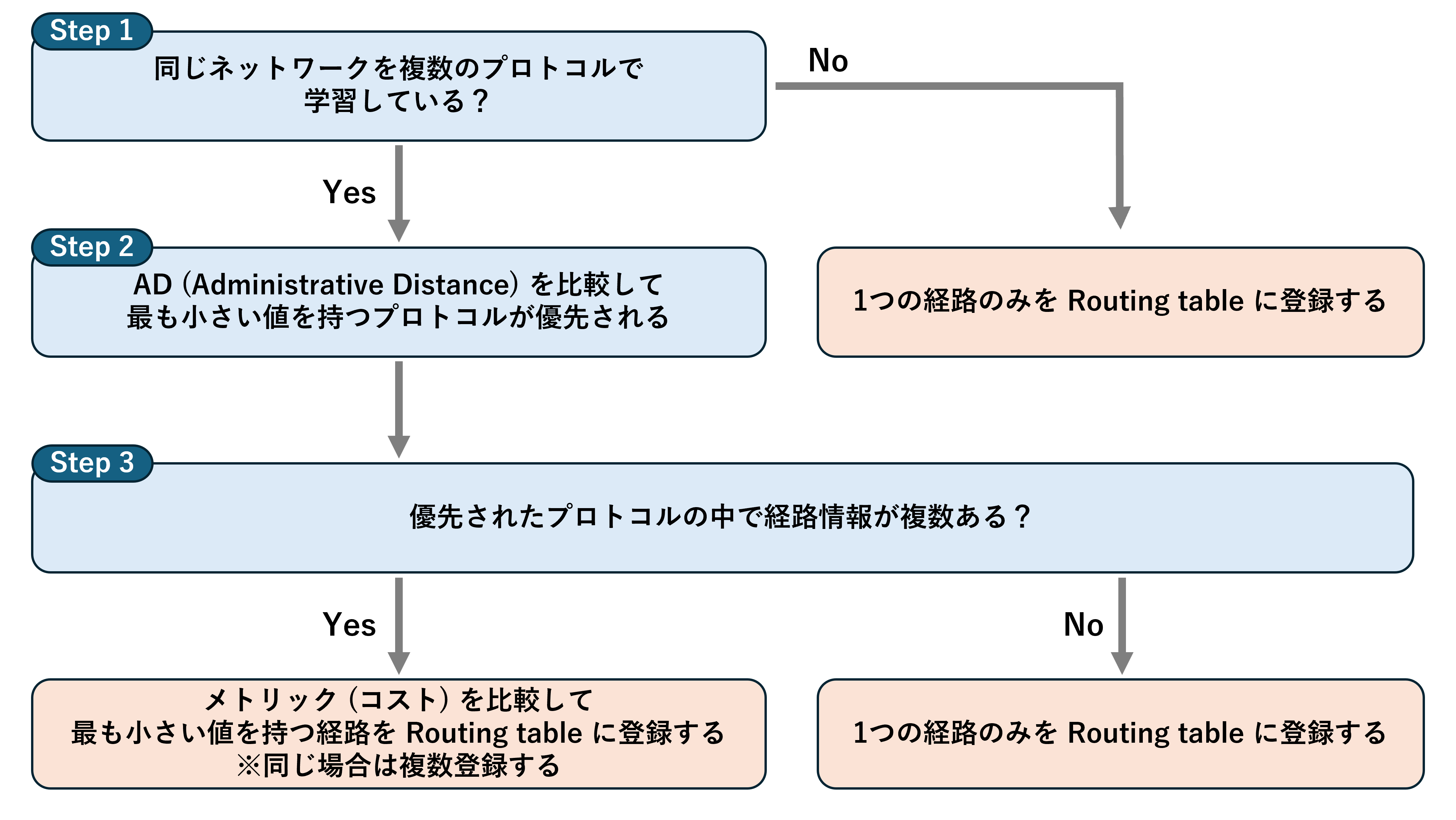
AD (Administrative Distance) とは、Routing protocol ごとに割り当てられている経路情報の優先度です。
RT1 は 192.0.2.2 に対して AD の小さい Ethernet0/0 を出力インターフェースとした経路情報が登録されています。
RT1#show ip route
Codes: L - local, C - connected, S - static, R - RIP, M - mobile, B - BGP
       D - EIGRP, EX - EIGRP external, O - OSPF, IA - OSPF inter area
       N1 - OSPF NSSA external type 1, N2 - OSPF NSSA external type 2
       E1 - OSPF external type 1, E2 - OSPF external type 2, m - OMP
       n - NAT, Ni - NAT inside, No - NAT outside, Nd - NAT DIA
       i - IS-IS, su - IS-IS summary, L1 - IS-IS level-1, L2 - IS-IS level-2
       ia - IS-IS inter area, * - candidate default, U - per-user static route
       H - NHRP, G - NHRP registered, g - NHRP registration summary
       o - ODR, P - periodic downloaded static route, l - LISP
       a - application route
       + - replicated route, % - next hop override, p - overrides from PfR
       & - replicated local route overrides by connected

Gateway of last resort is not set

      10.0.0.0/8 is variably subnetted, 4 subnets, 2 masks
C        10.1.1.0/24 is directly connected, Ethernet0/0
L        10.1.1.1/32 is directly connected, Ethernet0/0
C        10.1.2.0/24 is directly connected, Ethernet0/1
L        10.1.2.1/32 is directly connected, Ethernet0/1
      192.0.2.0/32 is subnetted, 2 subnets
C        192.0.2.1 is directly connected, Loopback0
S        192.0.2.2 [1/0] via 10.1.1.2, Ethernet0/0
RT2 は 192.0.2.1 に対して AD の小さい Ethernet0/0 を出力インターフェースとした経路情報が登録されています。
RT2#show ip route
Codes: L - local, C - connected, S - static, R - RIP, M - mobile, B - BGP
       D - EIGRP, EX - EIGRP external, O - OSPF, IA - OSPF inter area
       N1 - OSPF NSSA external type 1, N2 - OSPF NSSA external type 2
       E1 - OSPF external type 1, E2 - OSPF external type 2, m - OMP
       n - NAT, Ni - NAT inside, No - NAT outside, Nd - NAT DIA
       i - IS-IS, su - IS-IS summary, L1 - IS-IS level-1, L2 - IS-IS level-2
       ia - IS-IS inter area, * - candidate default, U - per-user static route
       H - NHRP, G - NHRP registered, g - NHRP registration summary
       o - ODR, P - periodic downloaded static route, l - LISP
       a - application route
       + - replicated route, % - next hop override, p - overrides from PfR
       & - replicated local route overrides by connected

Gateway of last resort is not set

      10.0.0.0/8 is variably subnetted, 4 subnets, 2 masks
C        10.1.1.0/24 is directly connected, Ethernet0/0
L        10.1.1.2/32 is directly connected, Ethernet0/0
C        10.1.2.0/24 is directly connected, Ethernet0/1
L        10.1.2.2/32 is directly connected, Ethernet0/1
      192.0.2.0/32 is subnetted, 2 subnets
S        192.0.2.1 [1/0] via 10.1.1.1, Ethernet0/0
C        192.0.2.2 is directly connected, Loopback0
3, Floating Static
今回は AD の小さい Ethernet0/0 を出力インターフェースとした経路が RT1, RT2 に登録されています。
shutdown したため、Ethernet0/0 が
Status : administrative down
Protocol : down
となっていることがわかります。
RT1#show ip interface brief
Interface              IP-Address      OK? Method Status                Protocol
Ethernet0/0            10.1.1.1        YES TFTP   administratively down down
Ethernet0/1            10.1.2.1        YES TFTP   up                    up
Ethernet0/2            unassigned      YES TFTP   administratively down down
Ethernet0/3            unassigned      YES TFTP   administratively down down
Loopback0              192.0.2.1       YES TFTP   up                    up
RT2#show ip interface brief
Interface              IP-Address      OK? Method Status                Protocol
Ethernet0/0            10.1.1.2        YES TFTP   administratively down down
Ethernet0/1            10.1.2.2        YES TFTP   up                    up
Ethernet0/2            unassigned      YES TFTP   administratively down down
Ethernet0/3            unassigned      YES TFTP   administratively down down
Loopback0              192.0.2.2       YES TFTP   up                    up
この状態で再度 Routing table を確認します。すると、Ethernet0/0 が down したことで Ethernet0/0 を出力インターフェースとした経路が消えています。
そして、優先されていた経路が消えたことで AD 100 の経路が現状最も優先度の高い経路となり、Routing table に登録されていることがわかります。
※経路情報にある [100/0] が [AD / Metric] の値を示しています。
RT1#show ip route
Codes: L - local, C - connected, S - static, R - RIP, M - mobile, B - BGP
       D - EIGRP, EX - EIGRP external, O - OSPF, IA - OSPF inter area
       N1 - OSPF NSSA external type 1, N2 - OSPF NSSA external type 2
       E1 - OSPF external type 1, E2 - OSPF external type 2, m - OMP
       n - NAT, Ni - NAT inside, No - NAT outside, Nd - NAT DIA
       i - IS-IS, su - IS-IS summary, L1 - IS-IS level-1, L2 - IS-IS level-2
       ia - IS-IS inter area, * - candidate default, U - per-user static route
       H - NHRP, G - NHRP registered, g - NHRP registration summary
       o - ODR, P - periodic downloaded static route, l - LISP
       a - application route
       + - replicated route, % - next hop override, p - overrides from PfR
       & - replicated local route overrides by connected

Gateway of last resort is not set

      10.0.0.0/8 is variably subnetted, 2 subnets, 2 masks
C        10.1.2.0/24 is directly connected, Ethernet0/1
L        10.1.2.1/32 is directly connected, Ethernet0/1
      192.0.2.0/32 is subnetted, 2 subnets
C        192.0.2.1 is directly connected, Loopback0
S        192.0.2.2 [100/0] via 10.1.2.2, Ethernet0/1
RT2#show ip route
Codes: L - local, C - connected, S - static, R - RIP, M - mobile, B - BGP
       D - EIGRP, EX - EIGRP external, O - OSPF, IA - OSPF inter area
       N1 - OSPF NSSA external type 1, N2 - OSPF NSSA external type 2
       E1 - OSPF external type 1, E2 - OSPF external type 2, m - OMP
       n - NAT, Ni - NAT inside, No - NAT outside, Nd - NAT DIA
       i - IS-IS, su - IS-IS summary, L1 - IS-IS level-1, L2 - IS-IS level-2
       ia - IS-IS inter area, * - candidate default, U - per-user static route
       H - NHRP, G - NHRP registered, g - NHRP registration summary
       o - ODR, P - periodic downloaded static route, l - LISP
       a - application route
       + - replicated route, % - next hop override, p - overrides from PfR
       & - replicated local route overrides by connected

Gateway of last resort is not set

      10.0.0.0/8 is variably subnetted, 2 subnets, 2 masks
C        10.1.2.0/24 is directly connected, Ethernet0/1
L        10.1.2.2/32 is directly connected, Ethernet0/1
      192.0.2.0/32 is subnetted, 2 subnets
S        192.0.2.1 [100/0] via 10.1.2.1, Ethernet0/1
C        192.0.2.2 is directly connected, Loopback0
このようにインターフェースが down するなどした際に登録される static route を「浮き出てくる様子」と見立てて「Floating Static」と呼びます。
RT1#traceroute 192.0.2.2 source 192.0.2.1
Type escape sequence to abort.
Tracing the route to 192.0.2.2
VRF info: (vrf in name/id, vrf out name/id)
  1 10.1.2.2 1 msec 1 msec *
4, まとめ
各プロトコルの AD (Administrative Distance) を覚えることは非常に重要です。